
Choosing the best program for garden design can make planning easier and more fun. The right software helps you create beautiful outdoor spaces with simple tools.
Garden design programs vary in features and ease of use. Some focus on 2D layouts, while others offer 3D views for better visualization. Popular options include Garden Planner, which is great for beginners, and 3D CAD Architecture 11, offering detailed designs for gardens and homes.
DreamPlan Home Design provides free tools for landscaping, perfect for simple projects. Punch! Home & Landscape Design offers several versions with advanced features for professionals and hobbyists. Home Design 3D Outdoor & Garden lets you customize gardens on your device. Kyoto Gardens adds inspiration from traditional styles. Choosing the right program depends on your needs, skill level, and device compatibility.
Garden Planner
![Garden Planner [Download]](https://m.media-amazon.com/images/I/81FSsg57QEL._SL500_.png)
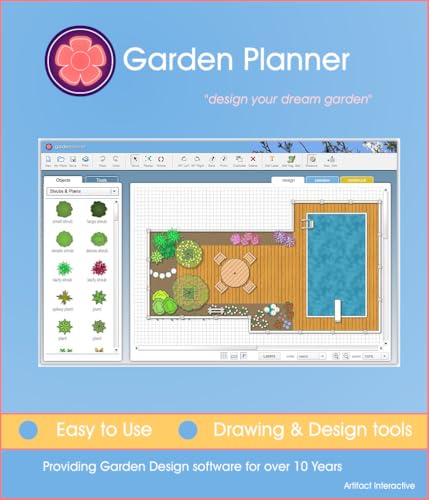
The Garden Planner [Download] by Artifact Interactive is ideal for gardening enthusiasts, landscape designers, and homeowners who want to efficiently plan and visualize their garden layouts. Whether you’re a beginner wanting to create a simple vegetable patch or an experienced gardener designing a complex landscape, this tool offers intuitive features to suit your needs.
Pros:
- User-friendly interface with drag-and-drop functionality
- Extensive plant database for accurate garden planning
- Customizable garden layouts with various design elements
- Version 3.5 includes enhanced features and improved performance
- Downloadable software for offline use
Cons:
- Limited to desktop use; no mobile app available
- Some advanced features may require a learning curve
- Occasional updates needed to expand plant database
The Garden Planner [Download] provides a comprehensive set of tools that allow users to create detailed garden designs with ease. Its drag-and-drop interface simplifies the process of placing plants, trees, and structures, making it accessible even to novices. The extensive plant database ensures that gardeners can select appropriate species for their climate and soil conditions, improving the chances of a thriving garden.
With the latest Edition 3.5, users benefit from optimized software performance and additional features that enhance design precision. The ability to customize garden layouts with various elements such as paths, fences, and furniture allows for a realistic and functional plan. As a downloadable product, it offers the convenience of offline access, enabling users to work on their projects anytime without internet dependency.
3d Cad Architecture 11
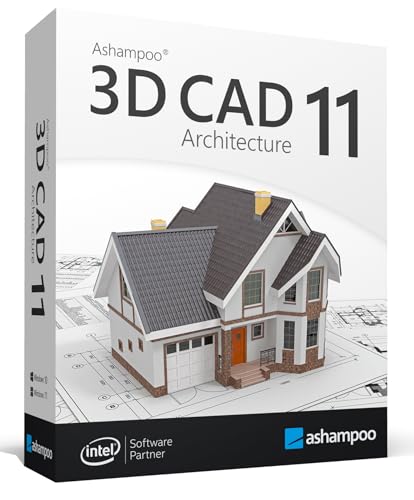
The 3D CAD Architecture 11 is perfect for homeowners, architects, and design enthusiasts looking to create detailed and realistic house, garden, balcony, and photovoltaic designs. Ideal for users who want to visualize their projects in both 2D and 3D, this software supports Windows 11 and 10, making it accessible for a wide range of users seeking precision and creativity in architectural planning.
Pros:
- Comprehensive design tools for house, garden, balcony, and photovoltaic layouts
- Supports both 2D and 3D objects for versatile visualization
- Compatible with Windows 11 and 10 operating systems
- Developed by the reputable brand Markt + Technik
- User-friendly interface suitable for both beginners and professionals
Cons:
- May require a learning curve for users new to CAD software
- System requirements might be demanding for older PCs
- Limited to Windows platforms, excluding Mac users
The 3D CAD Architecture 11 software offers an extensive range of features that enable users to create detailed architectural designs with ease. Its ability to handle both 2D and 3D objects allows for dynamic project visualization, helping users to better understand spatial relationships and design aesthetics before construction begins. This versatility benefits homeowners and professionals alike by reducing errors and streamlining the planning process.
With specialized tools tailored for designing gardens, balconies, and even photovoltaic systems, the software supports sustainable and personalized building projects. The integration with the Windows platform ensures smooth performance and access to regular updates from the trusted manufacturer, Markt + Technik. Overall, this design software combines technical precision with creative freedom, making it a valuable asset for anyone serious about architectural design.
Dreamplan Home Design And Landscaping Software
![DreamPlan Home Design and Landscaping Software Free for Windows [PC Download]](https://m.media-amazon.com/images/I/51kvZH2dVLL._SL500_.jpg)
The DreamPlan Home Design and Landscaping Software Free for Windows [PC Download] is ideal for homeowners, DIY enthusiasts, and budding architects who want to create detailed home and garden plans without the need for professional training. If you are looking to visualize your remodeling ideas or design your dream home and landscape on your PC, this software by NCH Software offers an accessible and user-friendly platform to bring your concepts to life.
Pros:
- Intuitive drag-and-drop interface makes designing easy for beginners
- Comprehensive tools for both home interior and landscaping design
- Free to download and use on Windows PCs
- Ability to create 3D models to visualize your plans realistically
- Includes a wide variety of customizable templates and objects
Cons:
- Limited advanced features compared to professional-grade software
- Only available for Windows, no Mac or mobile versions
- Some features may require a paid upgrade for full access
The DreamPlan software offers an excellent suite of features tailored for easy home and landscaping design. Users can create detailed floor plans, customize room dimensions, and add furniture and fixtures with simple tools. The landscaping module allows for the design of gardens, decks, and pools, helping users visualize outdoor spaces effectively. This versatility benefits homeowners planning renovations or new builds by providing a clear, interactive representation of their ideas.
One of the key advantages is the software’s ability to generate 3D walkthroughs, offering a realistic view of the design from multiple angles. This feature helps users better understand spatial relationships and make informed design decisions. Additionally, the free availability on Windows PCs ensures that cost is not a barrier, making it accessible for a wide range of users who want to experiment with home and landscape design without investing in expensive professional tools.
Punch! Home & Landscape Design Premium
![Punch! Home & Landscape Design Premium v20 [Download]](https://m.media-amazon.com/images/I/A1qRleE1d4L._SL500_.jpg)
The Punch! Home & Landscape Design Premium v20 [Download] is ideal for homeowners, DIY enthusiasts, and professional designers looking to create detailed and customizable home and landscape plans. If you want an intuitive yet powerful tool to visualize your renovation or landscaping projects before starting, this software is designed for you. It offers a comprehensive design experience suitable for both beginners and experienced users.
Pros:
- Intuitive drag-and-drop interface for easy design creation
- Extensive library of customizable objects and materials
- High-quality 3D rendering to visualize projects realistically
- Detailed landscaping tools including terrain shaping and plant placement
- Supports both home interior and exterior design in one platform
- Convenient digital download for instant access
Cons:
- May have a learning curve for users new to design software
- Advanced features might require a relatively powerful computer
- Limited collaboration features for team projects
The Punch! Home & Landscape Design Premium v20 boasts an extensive set of features that enable users to create intricate home and landscape designs with precision. The software’s drag-and-drop interface allows easy placement of walls, windows, doors, and landscaping elements, making the design process smooth and intuitive. Users can leverage the vast object library to customize their designs with furniture, fixtures, and plants, ensuring every detail aligns with their vision. The 3D rendering capabilities provide realistic visualizations, helping users better understand how their projects will look in real life.
Additionally, the software supports terrain modeling and advanced landscaping tools, which allow users to sculpt outdoor spaces creatively. This feature is particularly beneficial for those planning extensive garden layouts or outdoor living areas. Being a digital download from Encore Software, LLC, it offers quick setup and immediate access, enabling users to start their projects without delay. Overall, Punch! Home & Landscape Design Premium v20 combines ease of use with professional-grade tools, making it a versatile choice for anyone looking to design or renovate their home and outdoor spaces.
Punch! Home & Landscape Design Premium V19
![Punch! Home & Landscape Design Premium v19 - Home Design Software for Windows PC [Download]](https://m.media-amazon.com/images/I/B1MRV7v76kS._SL500_.jpg)
The Punch! Home & Landscape Design Premium v19 is ideal for homeowners, interior designers, and landscape enthusiasts who want a comprehensive yet user-friendly home design software. It is perfect for those looking to create detailed floor plans, customize interiors, and design outdoor spaces with professional results on their Windows PC. Whether you are planning a renovation, building a new home, or landscaping your yard, this software offers the tools necessary to bring your vision to life.
Pros:
- Intuitive drag-and-drop interface for easy design creation
- Extensive library of customizable objects and materials
- Ability to create both interior and exterior designs
- High-quality 3D rendering and walkthrough features
- Comprehensive tools for landscaping including terrain and plant options
- Quick download and installation for immediate use
Cons:
- Only compatible with Windows PC, no Mac version available
- May have a learning curve for absolute beginners
- Premium edition is pricier compared to basic versions
The Punch! Home & Landscape Design Premium v19 stands out with its powerful features that cater to both home and landscape design needs. Its extensive object library allows users to personalize every aspect of their project, from selecting furniture to landscaping elements, enabling a truly customized design experience. The software’s 3D rendering capabilities provide a realistic visualization, helping users to better understand how their designs will look in real life.
Additionally, the software supports detailed floor planning with precise measurements, which is crucial for anyone looking to execute construction or remodeling projects accurately. The inclusion of landscaping tools, such as terrain shaping and plant placement, offers a comprehensive solution for outdoor design, making it easier to create cohesive indoor and outdoor living spaces. Overall, this software provides both the functionality and flexibility needed for ambitious design projects.
Punch! Home & Landscape Design Professional
![Punch! Home & Landscape Design Professional v21 - Windows [PC Download]](https://m.media-amazon.com/images/I/51Mg05gZyDL._SL500_.jpg)
The Punch! Home & Landscape Design Professional v21 – Windows [PC Download] is ideal for homeowners, interior designers, and landscaping professionals looking to create detailed and customized home and garden plans. If you want a comprehensive yet user-friendly software to visualize renovations, landscaping projects, or interior design ideas, this product offers powerful tools tailored to meet your needs.
Pros:
- Comprehensive design tools for both home and landscape projects
- User-friendly interface suitable for professionals and beginners
- Extensive library of customizable templates and objects
- Supports 3D visualization to better imagine final designs
- Regular updates and technical support from Encore Software, LLC
Cons:
- Windows-only compatibility limits use on other operating systems
- Requires a relatively powerful PC for smooth performance
- Some advanced features may have a learning curve for new users
The Punch! Home & Landscape Design Professional v21 offers a robust set of features that allow users to create detailed floor plans, customize interior elements, and design outdoor spaces with precision. Its intuitive interface helps users quickly bring their ideas to life, while the extensive library provides a wealth of options to personalize each project. The 3D visualization capability enhances the design experience by offering a realistic preview, which can help in making informed decisions before actual implementation.
Designed by Encore Software, LLC, this software provides reliable performance and consistent updates to ensure compatibility and feature enhancements. While it is optimized for Windows PCs, the program’s powerful tools and resources make it a valuable asset for anyone serious about home and landscape design, whether for professional use or personal projects. The balance between ease of use and advanced functionality makes it an excellent choice for both beginners and seasoned designers.
Home Design 3d Outdoor & Garden
![Home Design 3D Outdoor & Garden [Download]](https://m.media-amazon.com/images/I/41qhxiu7HCL._SL500_.jpg)
The Home Design 3D Outdoor & Garden software is ideal for homeowners, landscape designers, and gardening enthusiasts who want to create detailed and personalized outdoor spaces. If you are looking to visualize your garden or outdoor area before making any physical changes, this tool offers an intuitive and comprehensive solution to bring your ideas to life.
Pros:
- Easy-to-use 3D design interface suitable for beginners and professionals alike
- Extensive library of customizable outdoor elements such as plants, furniture, and pathways
- Ability to visualize projects in real-time 3D for accurate planning
- Supports multiple platforms with a convenient downloadable edition from Anuman Interactive
Cons:
- Standard edition may have limited advanced features compared to premium versions
- Requires a compatible device for smooth 3D rendering performance
- Learning curve for users unfamiliar with digital design tools
Developed by Anuman Interactive, the Home Design 3D Outdoor & Garden software allows users to create detailed and customizable outdoor layouts with ease. Its user-friendly interface offers drag-and-drop functionality, enabling the placement of various garden elements like trees, shrubs, patios, and water features. This flexibility helps users experiment with different design ideas and optimize their outdoor spaces without the need for professional assistance.
The software’s real-time 3D visualization feature provides an immersive experience, allowing users to walk through their virtual garden to better understand the spatial relationships and aesthetics. Additionally, the downloadable format ensures easy access and installation on compatible devices, making it a convenient choice for both casual users and professionals. With its broad range of tools and options, this product enhances creativity and planning efficiency for anyone looking to improve their outdoor environment.
Punch! Home & Landscape Design 17.7
![Punch! Home & Landscape Design 17.7 Home Design Software for Windows PC [Download]](https://m.media-amazon.com/images/I/51TlgUnSk6L._SL500_.jpg)
The Punch! Home & Landscape Design 17.7 software is ideal for homeowners, DIY enthusiasts, and amateur designers who want to create detailed and personalized home and landscape plans without professional help. If you’re looking to visualize remodeling projects, design landscaping layouts, or plan your dream home on your Windows PC, this software provides a comprehensive and user-friendly solution.
Pros:
- Intuitive interface suitable for beginners and experienced users alike
- Extensive library of design templates and landscaping elements
- Powerful 3D visualization tools to preview projects realistically
- Regular updates and support from Encore Software, LLC
- Convenient digital download for quick installation
Cons:
- Available only for Windows PC, no Mac version
- Some advanced features may have a learning curve
- Requires a moderately powerful PC for smooth 3D rendering
The Punch! Home & Landscape Design 17.7 offers an extensive set of features that empower users to create both interior and exterior designs with precision. Its drag-and-drop functionality allows easy placement of furniture, fixtures, and landscaping elements, while the detailed customization options enable users to adjust dimensions, textures, and colors to match their vision. This flexibility ensures that every design is unique and tailored to individual preferences.
Additionally, the software’s robust 3D rendering capabilities provide realistic previews, helping users to better visualize their projects before starting construction or gardening. The ability to switch between 2D and 3D views simplifies the design process and improves accuracy. Overall, this tool enhances creativity, reduces costly mistakes, and makes home and landscape design accessible to everyone.
Punch! Home & Landscape Design Essentials
![Punch! Home & Landscape Design Essentials v19 for Windows PC [Download]](https://m.media-amazon.com/images/I/A1MrG0EQjXL._SL500_.jpg)
The Punch! Home & Landscape Design Essentials v19 for Windows PC [Download] is ideal for homeowners, DIY enthusiasts, and amateur designers looking to create detailed home and garden plans with ease. If you want to visualize renovations, landscaping projects, or new builds without professional help, this software offers user-friendly tools tailored for beginners and intermediate users.
Pros:
- Intuitive interface suitable for users with little design experience
- Comprehensive home and landscape design tools in one package
- Ability to create detailed 2D and 3D floor plans and landscapes
- Extensive library of customizable materials and objects
- Instantly visualize projects with realistic 3D walkthroughs
- Quick download and installation on Windows PC
Cons:
- Limited advanced features compared to professional design software
- Only compatible with Windows operating systems
- Some users may find the learning curve steep initially
The Punch! Home & Landscape Design Essentials v19 offers a robust set of features that simplify the process of designing your ideal home and outdoor spaces. Its powerful 2D and 3D design capabilities allow users to draft floor plans and visualize landscaping ideas with precision. This integration helps users save time and money by identifying potential issues before beginning physical work.
Additionally, the software includes a vast library of customizable materials and objects, enabling users to personalize their projects to match their unique tastes. The interactive 3D walkthroughs provide an immersive experience, making it easier to communicate ideas with contractors or family members. Overall, this tool empowers users to bring their creative visions to life confidently and efficiently.
Kyoto Gardens

The Kyoto Gardens is perfect for individuals who appreciate intricate design and cultural aesthetics, particularly those who have a passion for Japanese art and serene environments. Ideal for collectors, hobbyists, or anyone looking to add a touch of elegance and tranquility to their space, this item blends craftsmanship with meaningful symbolism.
Pros:
- Crafted by the reputable Mercury Software Japan Inc, ensuring high quality and authenticity.
- Lightweight design with a weight of only 0.110231131 pounds, making it easy to handle and display.
- Compact dimensions allow for versatile placement in various settings.
Cons:
- Limited size may not suit those looking for a larger decorative piece.
- Niche appeal might not resonate with all interior design styles.
The Kyoto Gardens by Mercury Software Japan Inc stands out due to its meticulous craftsmanship and cultural significance. Its lightweight and compact nature make it convenient for collectors and enthusiasts to showcase in multiple environments without worrying about cumbersome installation or maintenance. This item offers an authentic touch of Japanese elegance that enhances any living or working space.
Beyond its aesthetic appeal, the Kyoto Gardens serves as a symbol of peace and harmony, providing users with a calming influence in their daily lives. Its detailed design reflects traditional Japanese artistry, making it not just a decorative object but also a conversation starter and a meaningful addition to any collection.
Frequently Asked Questions
What Is The Best Garden Design Software?
The best garden design software varies based on needs. Popular options include Garden Planner and DreamPlan. These tools offer user-friendly interfaces and comprehensive features. They cater to both beginners and professionals. Consider your specific requirements, such as 3D visualization or detailed plant databases, when choosing.
Can I Design Gardens In 3d?
Yes, you can design gardens in 3D with software like 3D CAD Architecture 11. This tool allows you to create intricate garden designs. It provides options for visualizing your garden in both 2D and 3D. This helps in making detailed and accurate design plans.
Is Dreamplan Software Free To Use?
DreamPlan Home Design and Landscaping Software offers a free version for Windows users. It includes essential features for home and garden design. While the free version is limited, it provides adequate tools for basic design projects. For advanced features, consider upgrading to the paid version.
What Features Does Punch! Home Design Offer?
Punch! Home Design offers a range of features for designing home and landscape projects. It includes powerful design tools, 3D visualization, and detailed landscaping options. The software supports importing and exporting different file formats. It’s suitable for both beginners and professional designers seeking comprehensive tools.
How User-friendly Is Garden Planner?
Garden Planner is highly user-friendly, ideal for beginners in garden design. Its intuitive interface makes planning simple and efficient. Users can quickly create layouts and add plants or structures. It’s designed to be accessible, ensuring that even those with no design experience can create beautiful gardens.
Can I Use Kyoto Gardens For Design Inspiration?
Yes, Kyoto Gardens can serve as an excellent source of design inspiration. These gardens showcase traditional Japanese landscaping techniques. They emphasize harmony with nature, which can inspire unique garden designs. Incorporating elements like water features and stone arrangements can enhance your garden’s aesthetic.
Conclusion
Choosing the best program for garden design depends on your needs and skill level. Some tools like Garden Planner and DreamPlan offer simple ways to create beautiful outdoor spaces. Others, such as Punch! Home & Landscape Design versions, provide advanced features for detailed planning.
If you want 3D views, programs like 3-D CAD Architecture and Home Design 3D Outdoor & Garden are great choices. Kyoto Gardens adds a unique style for peaceful layouts. Each software has its own strengths, making it easier to visualize your ideas.
Try a few options to see which fits your style and project size. With the right program, designing your garden can be fun and stress-free. Start planning today and bring your dream garden to life step by step.